
Flame Festival12 - Google Play
You'll be able to see results in few seconds.
Publisher Description
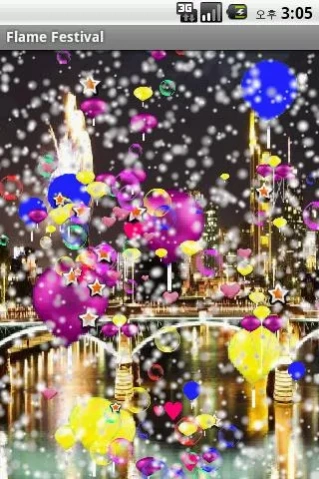


flame festival
In the app, you will be born as the main character of fireworks.
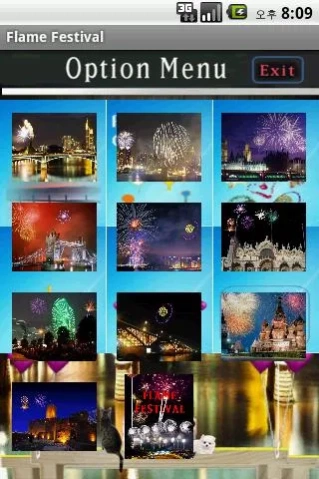
And for nice and beautiful fireworks you can select any option
You can spend an enjoyable and interesting time.
Feature consists of three categories.
1. Demonstrations sector of Fireworks .
2. Sector of my random design and enjoy fireworks designed.
3. Enjoy simple color matching game Yes-No sector.
4. Add on pop a balloon(Snow).
For fireworks, the option provides six kinds.
1. Background design.
2. Rocket-color design (fixed 1,5,9 line, 2,3,4,6,7,8-line only).
3. Flame type design (fixed 1,5,9 line, 2,3,4,6,7,8-line only).
4. You can specify the number of iterations.
5. Select your visitors and you can invite them to the fireworks.
6. For people who you love, you can write on banners.
(More Options)
1. Each country selected as the background of the famous places (total 11)
2. Flame shape and color of the arrow-shaped rocket, offers a variety of
3. Any physical appearance and a beautiful flame-shaped flame, providing 22
4. 1 set flame is the set of nine lines, 4 set are derived from the bundle.
Implementation of a bundle It takes about 1 minute.
The bundle can specify up to 10 times that auto-repeat.
5. Select the types of visitors, no people, lover, lovers, children, families, multiple families,
Many people may choose.
6. Writing on your favorite word and the banner can be written to.
● application execution environment:
* OS: Android 2.1
* Screen resolution: 480_800 pixels width X height
* Memory: 10 MB or more of storage space
Thank you.
About Flame Festival
The company that develops Flame Festival is 남진택(Jin Taeg,Nam). The latest version released by its developer is 12.
To install Flame Festival on your Android device, just click the green Continue To App button above to start the installation process. The app is listed on our website since 2011-07-22 and was downloaded 0 times. We have already checked if the download link is safe, however for your own protection we recommend that you scan the downloaded app with your antivirus. Your antivirus may detect the Flame Festival as malware as malware if the download link to com.visiontouch7.android.flamefestival is broken.
How to install Flame Festival on your Android device:
- Click on the Continue To App button on our website. This will redirect you to Google Play.
- Once the Flame Festival is shown in the Google Play listing of your Android device, you can start its download and installation. Tap on the Install button located below the search bar and to the right of the app icon.
- A pop-up window with the permissions required by Flame Festival will be shown. Click on Accept to continue the process.
- Flame Festival will be downloaded onto your device, displaying a progress. Once the download completes, the installation will start and you'll get a notification after the installation is finished.
Program Details
System requirements
Download information
Pricing
Version History
version 12
posted on 2011-07-22
1. Add on pop a balloon(Snow).
2. Swapping background.
3. Danding snow man.(touch)
4. Function upgrade.
version 12
posted on 2011-07-23
1. Add on pop a balloon(Snow).
2. Swapping background.
3. Danding snow man.(touch)
4. Function upgrade.
version 12
posted on 2011-07-22
Several fixes and updates
version 12
posted on 2011-07-22
Disclaimer
Official Google Play Link
We do not host Flame Festival on our servers. We did not scan it for viruses, adware, spyware or other type of malware. This app is hosted by Google and passed their terms and conditions to be listed there. We recommend caution when installing it.
The Google Play link for Flame Festival is provided to you by apps112.com without any warranties, representations or guarantees of any kind, so access it at your own risk.
If you have questions regarding this particular app contact the publisher directly. For questions about the functionalities of apps112.com contact us.
